

4.102. How to Give 1 Free Coffee For 5 Coffees?
In this document it will be explained how to give 1 Free Coffee for 5 Coffees.
How It Works;
1. Adding Custom Field For Customers Entity Type
Main Menu > Manage > Entities > Entity Types > Customers > Custom Fields > Here, click on Add Custom Field.
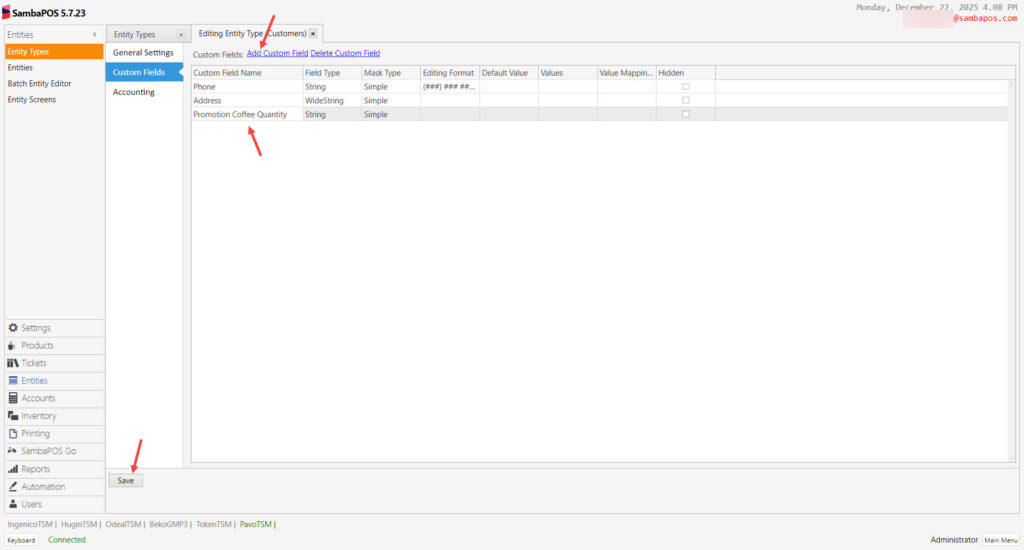
Custom Field Name: Promotion Coffee Quantity
Field Type: String
Mask Type: Simple
After completing necessary editings, click on Save button.
2. Adding Automation Commands
2.1. Adding PRC-Give Promotion Coffee Automation Command
Main Menu > Manage > Automation > Automation Commands > Here, click on Add Automation Command.
General Settings Section;
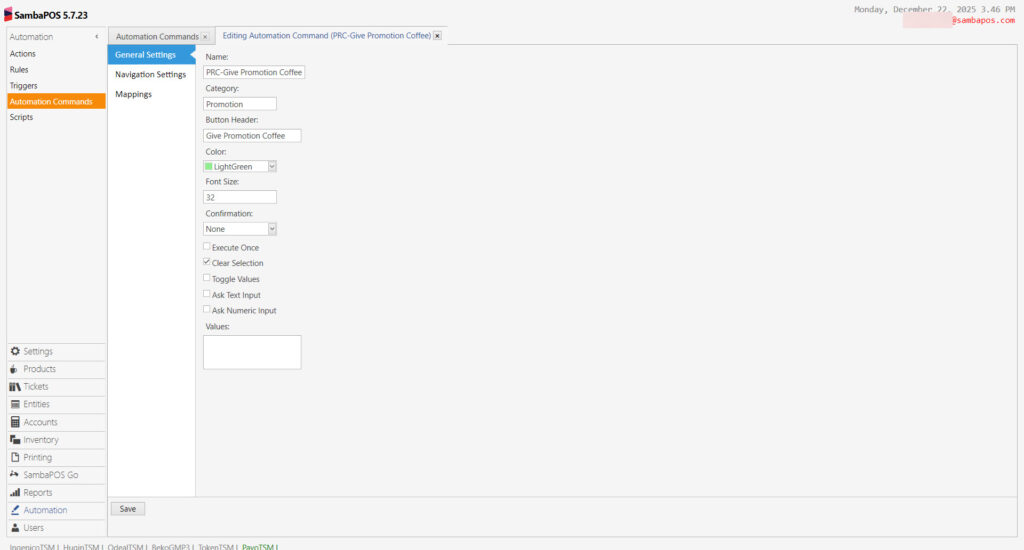
Name: PRC-Give Promotion Coffee
Category: Promotion
Button Header: Give Promotion Coffee
Mappings Section;
Here, add a line by clicking on Add button and set it as below image.
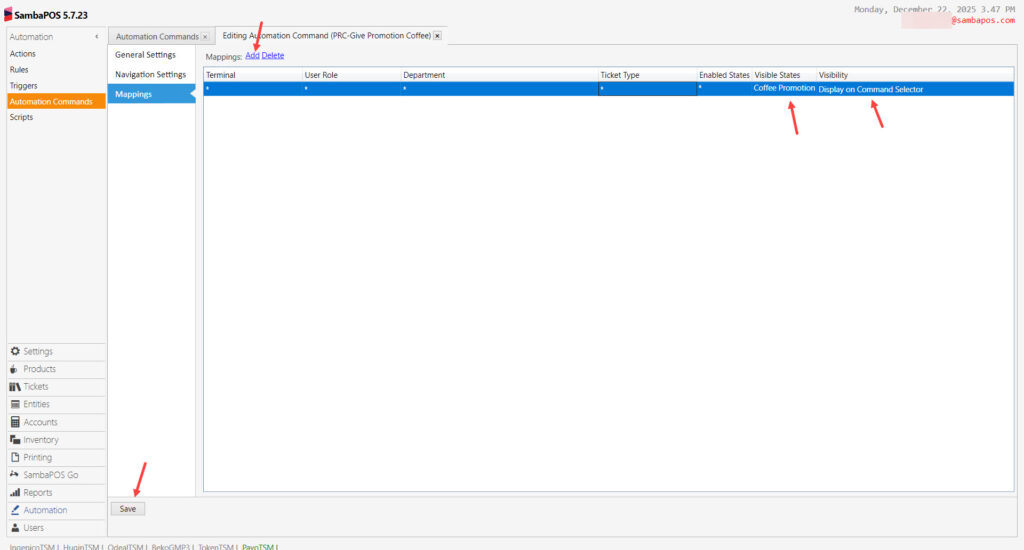
Visible States: Coffee Promotion
Visibility: Display on Command Selector
After completing necessary editings, click on Save button.
2.2. Adding PRC-Give Coffee Later Automation Command
Main Menu > Manage > Automation > Automation Commands > Here, click on Add Automation Command.
General Settings Section;
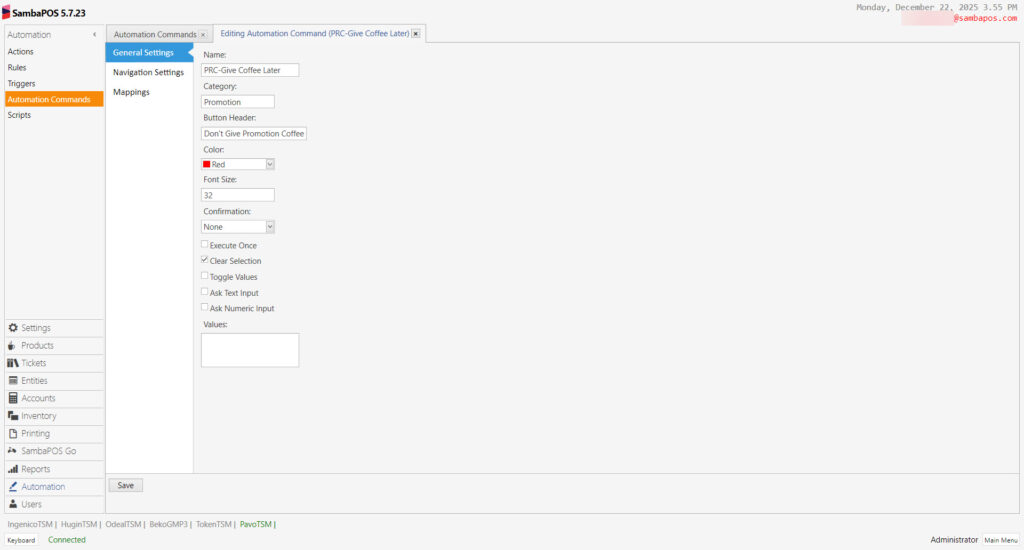
Name:PRC-Give Coffee Later
Category: Promotion
Button Header: Don’t Give Promotion Coffee
Mappings Section;
Here, add a line by clicking on Add button and set it as below image.
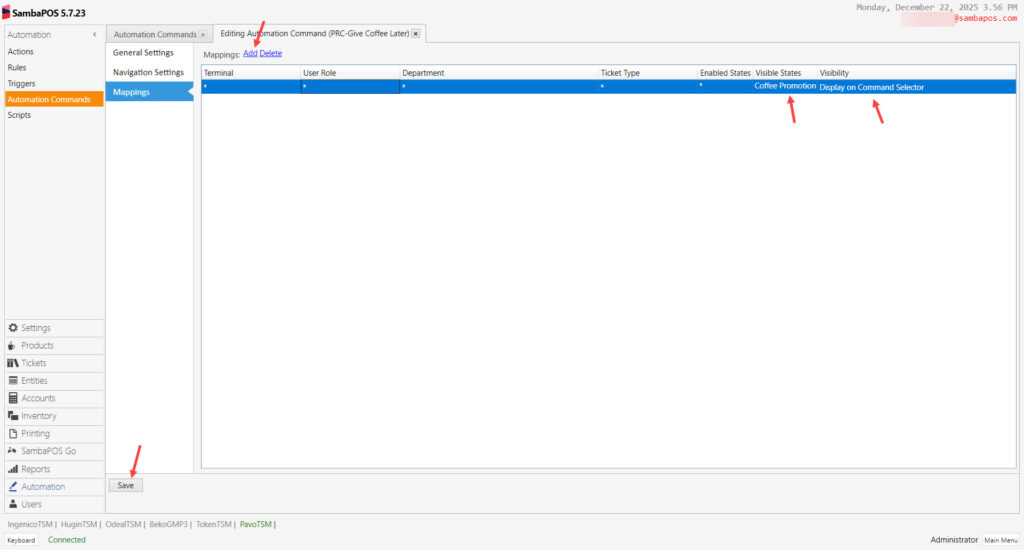
Visible States: Coffee Promotion
Visibility: Display on Command Selector
After completing necessary editings, click on Save button.
3. Adding Actions
3.1. Adding PRC- Give Free Coffee for 5th Coffee Action
Main Menu > Manage > Automation > Actions > Here, click on Add Action.
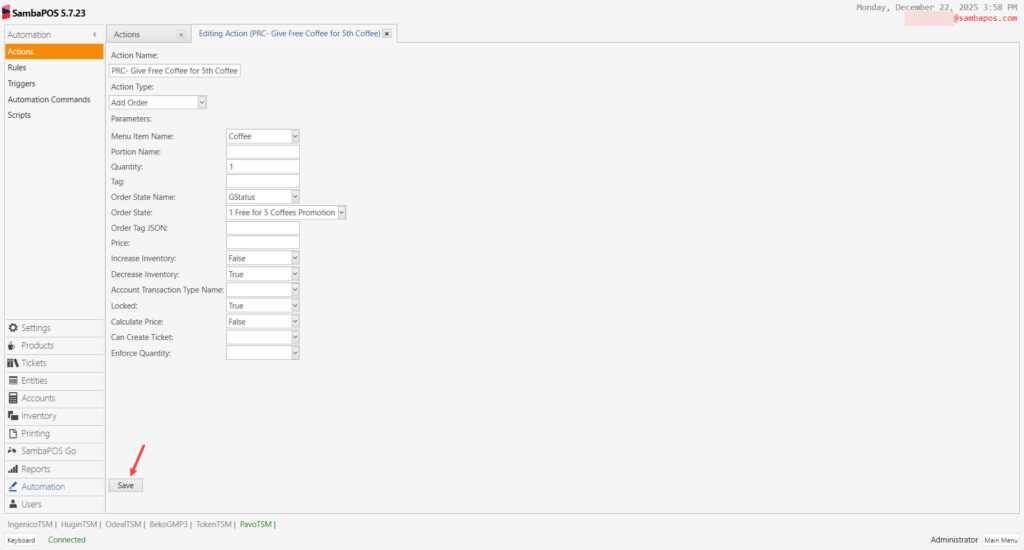
Action Name: PRC- Give Free Coffee for 5th Coffee
Action Type: Add Order
Menu Item Name: Coffee
Quantity: 1
Order State Name: GStatus
Order State: 1 Free for 5 Coffees Promotion
Increase Inventory: False
Decrease Inventory: True
Locked: True
Calculate Price: False
After completing necessary editings, click on Save button.
3.2. Adding PRC-Resfresh Ticket Action
Main Menu > Manage > Automation > Actions > Here, click on Add Action.
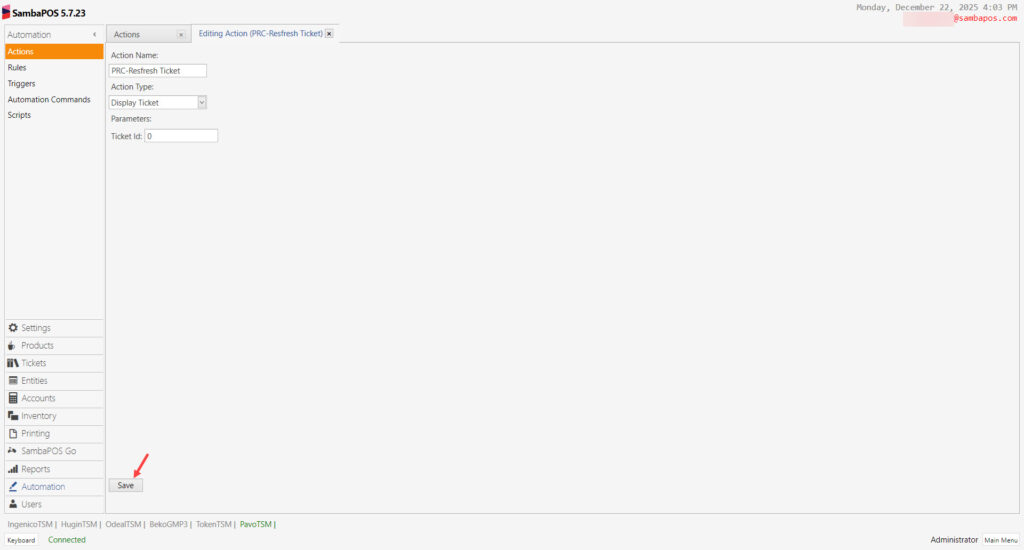
Action Name: PRC-Resfresh Ticket
Action Type: Display Ticket
Parameters:
Ticket Id: 0
After completing necessary editings, click on Save button.
3.3. Adding PRC-Display Promotion Commands Action
Main Menu > Manage > Automation > Actions > Here, click on Add Action.
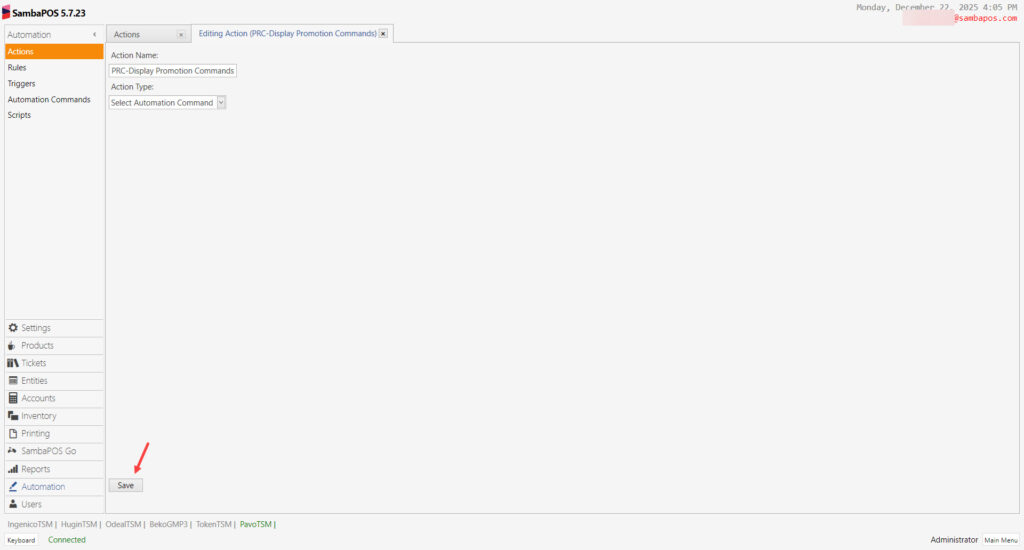
Action Name: PRC-Display Promotion Commands
Action Type: Select Automation Command
After completing necessary editings, click on Save button.
3.4. Adding PRC-Update Customer Coffee Promotion Quantity Action
Main Menu > Manage > Automation > Actions > Here, click on Add Action.
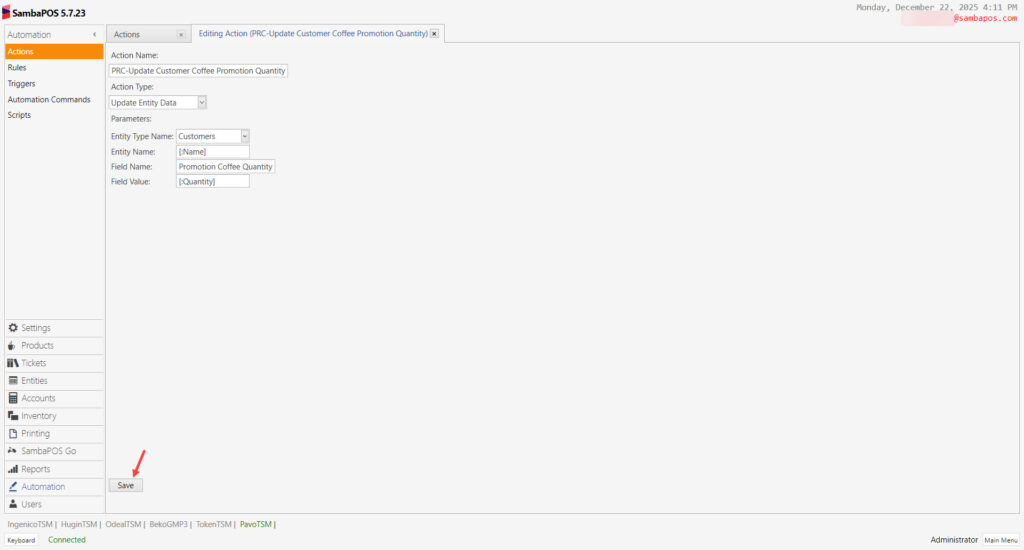
Action Name: PRC-Update Customer Coffee Promotion Quantity
Action Type: Update Entity Data
Parameters:
Entity Type Name: Customers
Entity Name: [:Name]
Field Name: Promotion Coffee Quantity
Field Value: [:Quantity]
After completing necessary editings, click on Save button.
3.5. Adding PRC-Update Order Promotion Status Action
Main Menu > Manage > Automation > Actions > Here, click on Add Action.
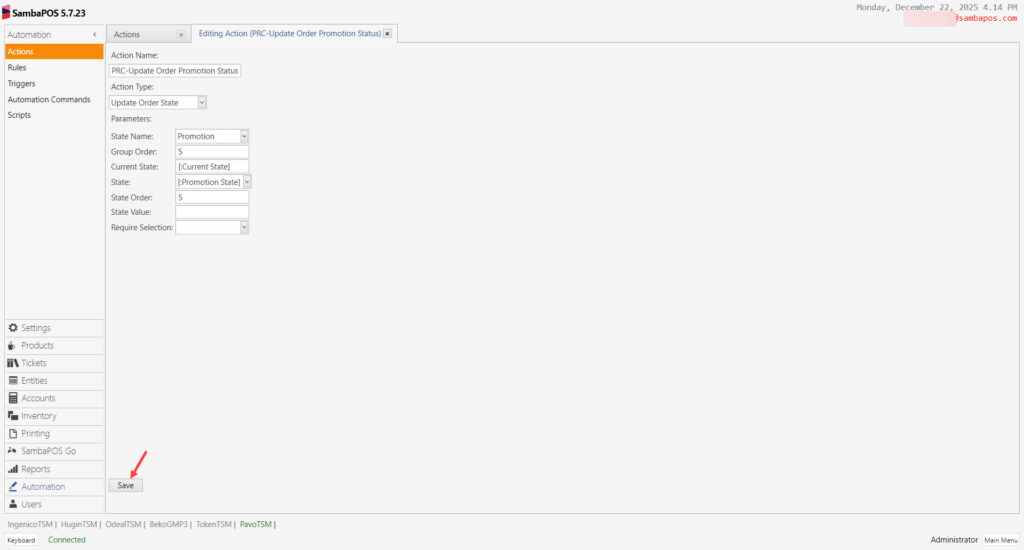
Action Name: PRC-Update Order Promotion Status
Action Type: Update Order State
Parameters:
State Name: Promotion
Group Order: 5
Current State: [:Current State]
State: [:Promotion State]
State Order: 5
After completing necessary editings, click on Save button.
3.6. PRC-Start Coffee Promotion Action
Main Menu > Manage > Automation > Actions > Here, click on Add Action.
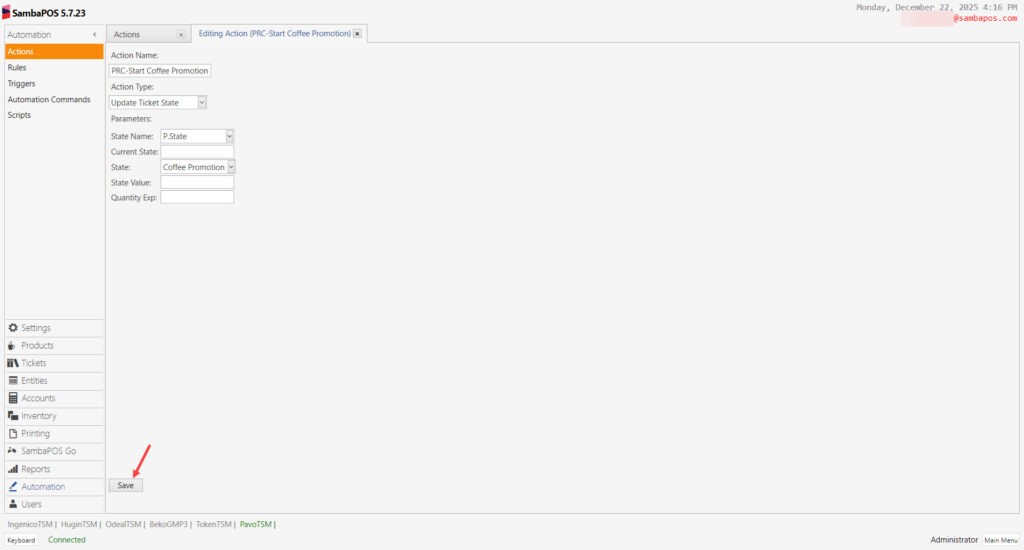
Action Name: PRC-Start Coffee Promotion
Action Type: Update Ticket State
Parameters:
State Name: P.State
State: Coffee Promotion
After completing necessary editings, click on Save button.
3.7. PRC-Stop Coffee Promotion Action
Main Menu > Manage > Automation > Actions > Here, click on Add Action.
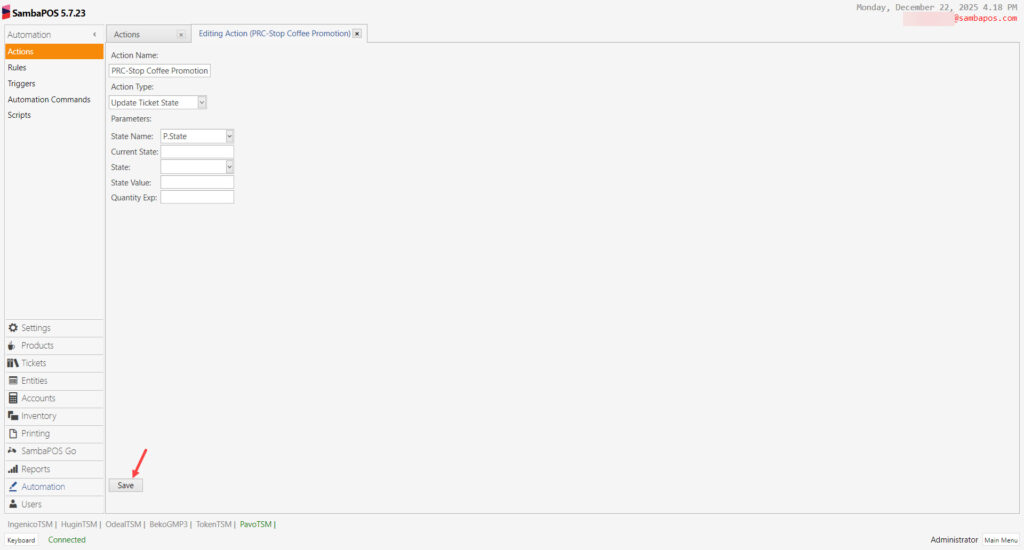
Action Name: PRC-Stop Coffee Promotion
Action Type: Update Ticket State
Parameters:
State Name: P.State
After completing necessary editings, click on Save button.
4. Adding Rules
4.1. Adding PRC-When Clicked on Give Promotion Coffee Button Rule
Main Menu > Manage > Automation > Rules > Here, click on Add Rule.
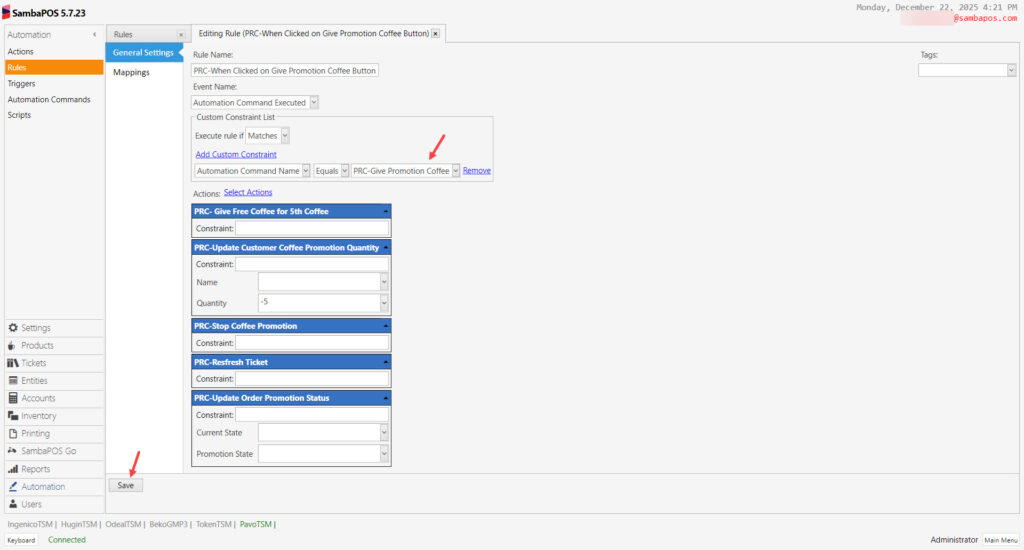
Rule Name: PRC-When Clicked on Give Promotion Coffee Button
Even Name: Automation Command Executed
Execute Rule If: Matches
Add Custom Constraint:
Automation Command Name|Equals|PRC-Give Promotion Coffee
Select Actions:
Action-1: PRC- Give Free Coffee for 5th Coffee
Action-2: PRC-Update Customer Coffee Promotion Quantity
Quantity: -5
Action-3: PRC-Stop Coffee Promotion
Action-4: PRC-Resfresh Ticket
Action-5: PRC-Update Order Promotion Status
After completing necessary editings, click on Save button.
4.2. Adding PRC-Give Coffee Later Rule
Main Menu > Manage > Automation > Rules > Here, click on Add Rule.
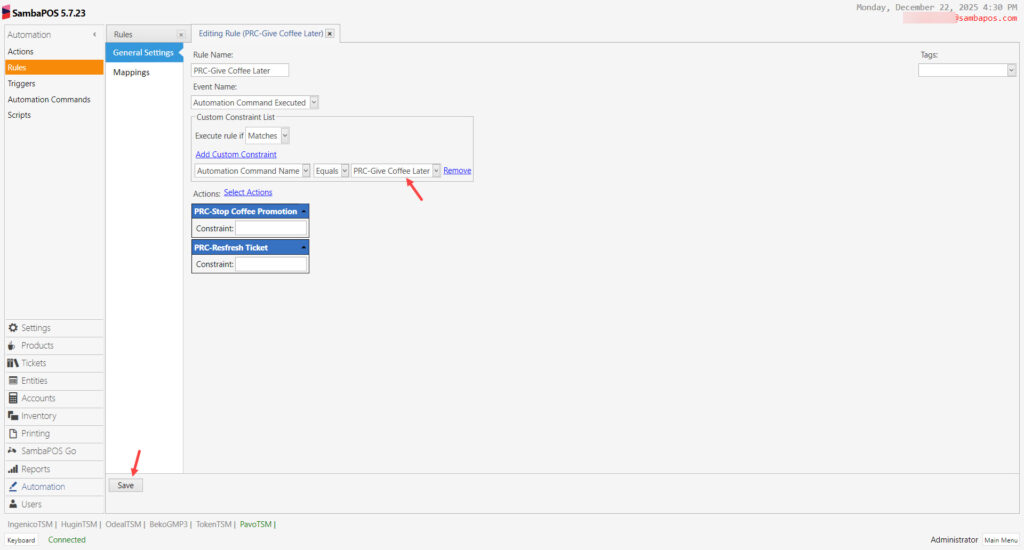
Rule Name: PRC-Give Coffee Later
Even Name: Automation Command Executed
Execute Rule If: Matches
Add Custom Constraint:
Automation Command Name|Equals|PRC-Give Coffee Later
Select Actions:
Action-1: PRC-Stop Coffee Promotion
Action-2: PRC-Resfresh Ticket
After completing necessary editings, click on Save button.
4.3. Adding PRC-Before Promotioned Ticket Paid Rule
Main Menu > Manage > Automation > Rules > Here, click on Add Rule.
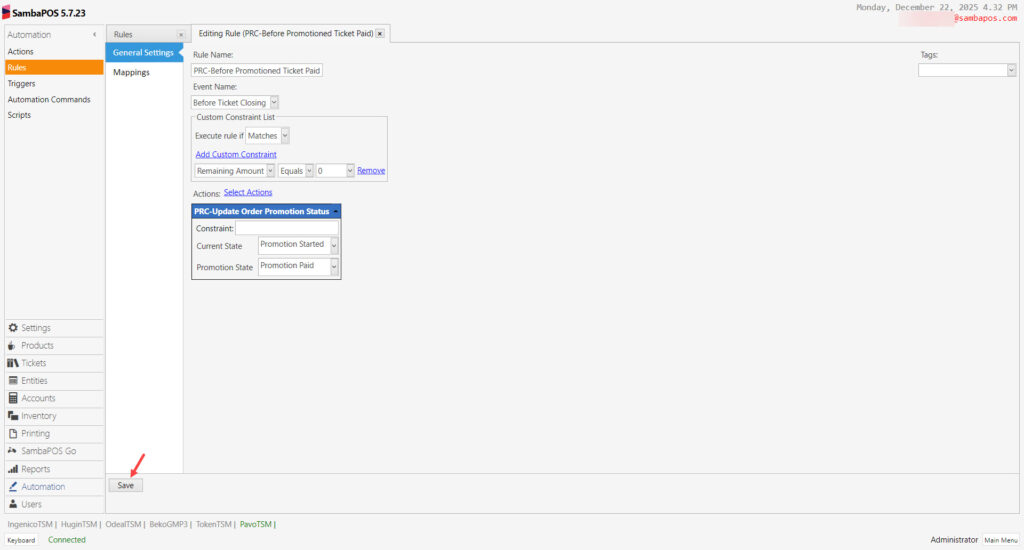
Rule Name: PRC-Before Promotioned Ticket Paid
Even Name: Before Ticket Closing
Execute Rule If: Matches
Add Custom Constraint:
Remaining Amount|Equals|0
Select Actions:
Action:PRC-Update Order Promotion Status
Current State: Promotion Started
Promotion State: Promotion Paid
After completing necessary editings, click on Save button.
4.4. Adding PRC-Update Status When Promotioned Item Added to Ticket Rule
Main Menu > Manage > Automation > Rules > Here, click on Add Rule.
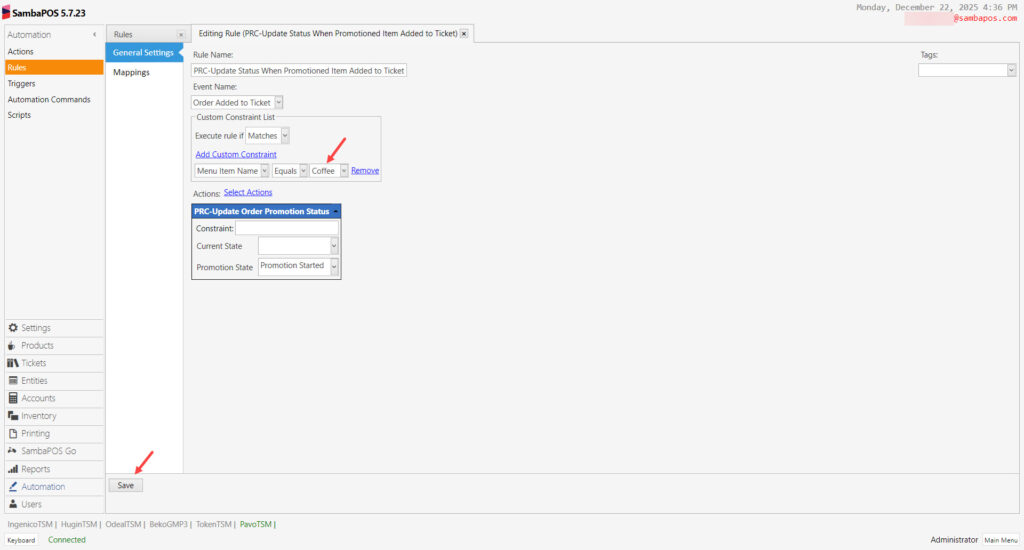
Rule Name: PRC-Update Status When Promotioned Item Added to Ticket
Even Name: Order Added to Ticket
Execute Rule If: Matches
Add Custom Constraint:
Menu Item Name|Equals|Coffee
Select Actions:
Action: PRC-Update Order Promotion Status
Promotion State: Promotion Started
After completing necessary editings, click on Save button.
4.5. Adding PRC-When Promotion Item Paid Update Promotion Quantity Rule
Main Menu > Manage > Automation > Rules > Here, click on Add Rule.
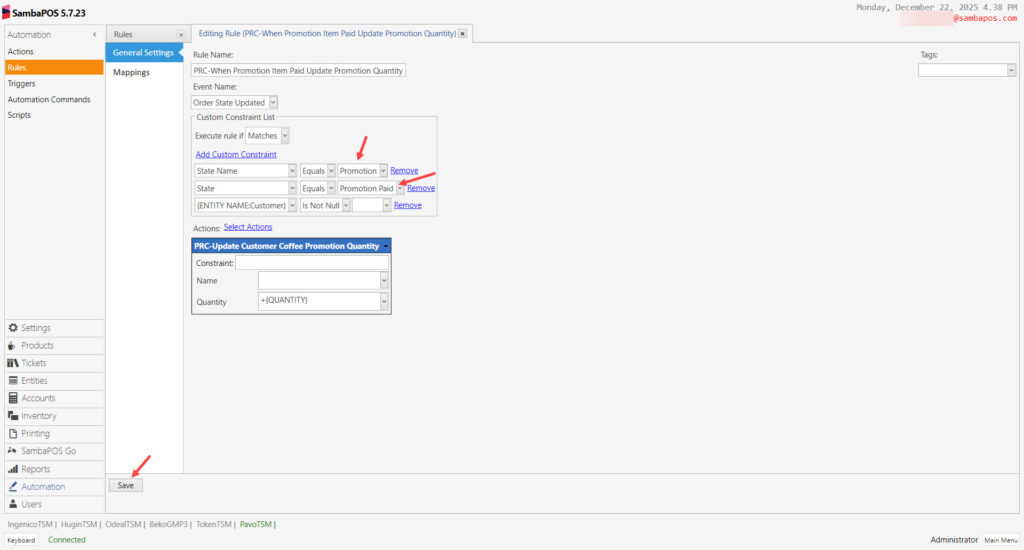
Rule Name: PRC-When Promotion Item Paid Update Promotion Quantity
Even Name: Order State Updated
Execute Rule If: Matches
Add Custom Constraint:
State Name|Equals|Promotion
State|Equals|Promotion Paid
{ENTITY NAME:Customer}|Is Not Null|
Select Actions:
Action: PRC-Update Customer Coffee Promotion Quantity
Quantity: +{QUANTITY}
After completing necessary editings, click on Save button.
4.6. Adding PRC-Display Promotion Commands When Coffee Quantity Reaches 5 Rule
Main Menu > Manage > Automation > Rules > Here, click on Add Rule.
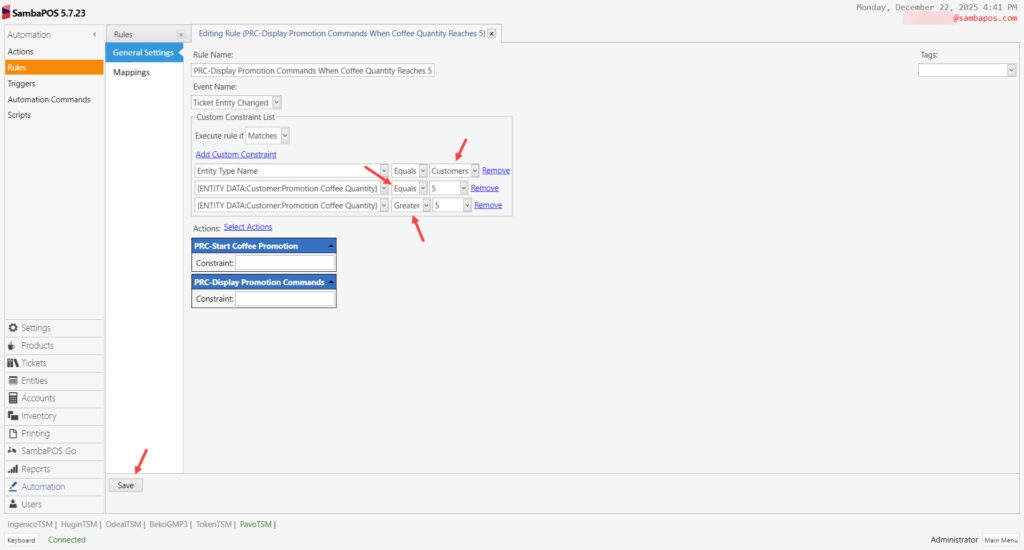
Rule Name: PRC-Display Promotion Commands When Coffee Quantity Reaches 5
Even Name: Ticket Entity Changed
Execute Rule If: Matches
Add Custom Constraint:
Entity Type Name|Equals|Customers
{ENTITY DATA:Customer:Promotion Coffee Quantity}|Equals|5
{ENTITY DATA:Customer:Promotion Coffee Quantity}|Greater|5
Select Actions:
Action-1: PRC-Start Coffee Promotion
Action-2: PRC-Display Promotion Commands
After completing necessary editings, click on Save button.